Thermometer For Room Temp
- 4.1
- Rating
- 500.00K
- Installs
- Free
- Price
 Analysis by App-foxy
I approached Thermometer For Room Temp as a small, practical weather app rather than a replacement for a professional instrument. Its purpose is straightforward: help you check the temperature in the room around you, using an Android device running a compatible system. That sounds simple, but this kind of tool is judged less by its appearance than by whether the reading makes sense when you need it.
My overall impression is that it is most useful as a quick reference. If I want to know whether a bedroom feels unusually warm, whether a workspace has cooled down, or whether a room is comfortable before settling in, an app like this can be convenient. It is free to install, aimed at Everyone, and comes from Micro Inc. The store rating sits at 4.0 from roughly 3.2 thousand ratings, which suggests a generally positive but not universally smooth experience.
The important thing is to understand what I am checking: a phone-based room-temperature reading is not automatically the same as a dedicated thermometer. The phone may be warm from charging, gaming, sunlight, or being held in a pocket. That distinction shapes the entire experience. Used patiently, the app can be handy. Used as a medical, laboratory, or safety instrument, it is the wrong choice.
You May Also Like

 Blood Strike: 2.5 Anniversary
Blood Strike’s Loadouts Turn Every Drop Into a Tactical Gamble
A close look at Blood Strike’s custom loadouts: how fast access to signature weapons reshapes its battle royale rhythm, rewards preparation, and narrows the gap between fights.

 Pandora - Music & Podcasts
Pandora’s Music Is Easy to Start, but Harder to Recover
Pandora’s strength is its low-effort path from a seed to a station. Its weak spot is how much confidence it asks you to place in connection, setup, and quiet recovery.

 8 Ball Pool
 Is Built on Rivalries, Rematches, and Routine
A close look at the rivalries, rematches, shared routines, and unanswered safety questions that turn a quick pool match into a persistent mobile community.

 Samsung Music
’s Quiet Strength Is Playing What You Already Own
Its reach comes less from spectacle than from dependable access to a personal library. That simplicity is both the app’s strongest retention engine and its ceiling.

 AccuWeather: Weather Radar
AccuWeather Review: A Quick, Clear Forecast for Everyday Decisions
For everyday plans, the best forecast is the one you can understand quickly. AccuWeather makes rain timing, radar, and local conditions easy to act on, with a few trade-offs.

 Hill Climb Racing
Why Hill Climb Racing Still Turns Crashes Into One More Run
A tiny car, a bumpy hill and one more upgrade: Hill Climb Racing keeps resurfacing because its simple chaos makes every near-miss feel personal.
More From Our News Desk



Getting past the first points of friction
I focus this section on making the first check easier to repeat, especially when the phone has just been used or feels warm. I also consider how choosing one consistent spot can reduce guesswork, so the reading is more useful for comparing rooms rather than judging a single number in isolation.
Why the first reading can be disappointing
The most common frustration with an indoor thermometer app is expecting an instant, perfectly neutral measurement. A phone is a source of heat as well as a device that may contain sensors. If I open the app immediately after charging, navigation, streaming, or leaving the handset in direct sunlight, the result may reflect the phone’s recent condition more than the room itself.
That does not necessarily mean the app is broken. It means the starting point is poor. I get a more useful check when I put the phone on a stable surface away from windows, radiators, vents, and my hand, then give it time to settle. The exact waiting period will vary with the handset and surroundings, so I treat the first number as an initial indication rather than the final answer.
This is a particularly important habit in a small room. A phone beside a warm laptop, a mug of tea, or a charging adapter is not sampling the same air as a phone placed on an open shelf. The app can display a clear result while the surrounding conditions are still unsuitable for a meaningful comparison.
What the app is good at noticing
I find this type of tool most useful for changes rather than absolute precision. For example, I can check a room before opening a window, check it again after ventilation, and compare the direction of change. That gives me a simple way to notice whether the space is becoming warmer or cooler.
It also works well for everyday comfort decisions. If a child’s room feels stuffy, if a home office becomes uncomfortable during the afternoon, or if a bedroom seems colder than the rest of the home, the app offers a quick extra reference before I adjust heating or ventilation. I would still rely on a proper thermometer when the difference matters, but the app can help me decide whether further checking is worthwhile.
A less obvious use is checking consistency between places. I can let the phone settle in one room, record the displayed result, then repeat the process in another room under similar conditions. The comparison is not a scientific survey, but it can reveal a noticeable difference between a sunny room and an interior room, or between a lower floor and an upper floor.
Setup checks that improve the result
Before blaming the application, I use a short preparation routine. I remove the phone from a case if the handset feels warm, stop any demanding activity, disconnect it from charging, and place it somewhere with ordinary airflow. I avoid holding it while reading because my hand can warm the device quickly.
I also check whether the room itself is in transition. A recently opened door, a running heater, an air conditioner, or sunlight across the table can create local conditions that are not representative of the whole room. If I want a general room impression, I choose a central, shaded location instead of the nearest convenient surface.
Another useful check is to repeat the reading under the same conditions. If the number changes sharply while the phone remains untouched, I do not immediately interpret that as a real room change. I first allow more settling time and compare the result with a physical thermometer if accuracy is important.
The application is free, although in-app purchases are listed from $1.99 to $12.99 per item. I would pay attention to any purchase screen during normal use and decide whether the free experience already covers my needs. For a simple occasional temperature check, I would not assume that paying is necessary simply because an optional purchase is available.
Compatibility and basic installation expectations
The current version is 1.26.43, and the app supports Android 6.0 or later. That makes it accessible to many older Android phones, but compatibility alone does not guarantee identical behavior across devices. Different handsets have different hardware, thermal characteristics, and sensor arrangements, so two phones can produce different readings in the same room.
It has passed the scale test of a widely used utility, with over 500 thousand installs, but popularity does not turn a phone into a calibrated measuring instrument. I see the install count as reassurance that the app is easy enough for many people to try, not as proof that every device will measure equally well.
Recovering when a reading looks wrong
Here I look at what I do when a result conflicts with how the room feels, and how to tell a temporary phone-related effect from a change in the space itself. A calm second check, made after adjusting the phone’s placement and allowing it to settle, can help clarify whether a dedicated thermometer is needed.
A simple recovery workflow
When the displayed temperature seems implausible, I avoid repeatedly refreshing the app while holding the phone. That usually adds noise instead of information. My recovery process is more deliberate: close the app, let the phone return to normal room conditions, place it on a neutral surface, and open the app again after the device has had time to settle.
I then compare the new reading with the physical sensation of the room and, if available, a separate household thermometer. The goal is not to force both values to match immediately. I am looking for a stable pattern. If both instruments show a similar direction after the room changes, the app is serving its practical purpose even if the values are not identical.
Restarting the phone can be reasonable if the application is frozen, fails to display a result, or behaves inconsistently after ordinary checks. I would also make sure the operating system is not heavily overloaded and that the app is running on the supported Android version. These are basic steps, but they separate a temporary device problem from a measurement limitation.
How to interpret an unusual result
A surprising number deserves context. If the phone was in a car, near a window, under a blanket, or in a pocket, I assume the handset has not equilibrated with the room. If the room has just changed, I expect the air and surfaces to settle at different speeds. A wall, desk, and phone can all have different temperatures even when they are in the same space.
I also avoid treating one reading as a trend. For a useful comparison, I take readings at similar locations and under similar conditions. This is one of the strongest practical habits for the app: consistency of placement matters more than repeatedly checking at random spots.
For people monitoring a sensitive environment, I would use the app as a prompt to investigate, not as the final authority. A nursery, storage area, server corner, greenhouse, or room containing temperature-sensitive items deserves a dedicated thermometer designed for that purpose. The app may tell me that something feels different, but it should not be the only basis for a safety decision.
When the phone is the real source of the problem
It is easy to blame the application when the handset is producing heat. Charging is an obvious example, but heavy background activity can have the same effect. A phone that has just been used for demanding tasks may remain warm after the screen returns to normal. In that situation, waiting is more useful than changing settings repeatedly.
Cases can also slow cooling, especially thick protective covers or designs that trap heat around the back. I do not remove a case automatically for every check, but if the phone feels warmer than the room, I use that as a warning that the reading may be biased.
Placement creates another hidden problem. A phone on a dark windowsill in sunlight, beside a warm appliance, or pressed against fabric is measuring a very local environment. For a room-level impression, I prefer an open, shaded surface with air around the device. That small change can make the workflow more repeatable.
When the app is not the cause
Sometimes the apparent error comes from the question being asked. “What is the room temperature?” can mean the air near the floor, the air at desk height, the temperature beside a window, or the temperature where a person is sitting. Those are not always the same. The app can only provide a reading from the conditions surrounding the phone at that moment.
Heating and cooling systems make this especially clear. A vent may create a cold or warm stream that does not represent the rest of the room. A portable heater can create a hot zone close by while the opposite side remains cool. If I want a general reading, I avoid those direct streams and choose a location that reflects the area I actually care about.
Humidity is another reason not to overinterpret comfort. A room can feel warmer or colder than its measured temperature because of moisture, airflow, clothing, and activity. This app is focused on room temperature, so I do not expect it to explain every reason a space feels uncomfortable.
Who will appreciate it most
I think this app suits people who want a quick, low-commitment reference on an Android phone. Renters checking an unevenly heated apartment, students in a dorm room, home workers comparing a desk area with a bedroom, and anyone curious about indoor changes can all get practical value from it.
It is also a reasonable first step for someone who does not yet own a thermometer. The free entry point makes experimentation easy, and the Everyone content rating keeps it approachable for general household use. I would recommend it to a friend with the clear advice that it is a convenience tool, not a precision device.
Who should choose something else
I would skip it if the main requirement is certified accuracy, automatic long-term logging, alerts, or dependable readings in a controlled environment. A dedicated digital thermometer is better when I need a stable sensor designed specifically for ambient temperature. A connected environmental monitor is more suitable when I want historical records, remote checks, or multiple measurements such as humidity.
I would also choose a physical instrument for health-related decisions. If someone is checking whether a person has a fever, the room-temperature app is not the appropriate tool. The same applies to protecting medication, food, animals, electronics, or other items where a wrong reading could cause harm.
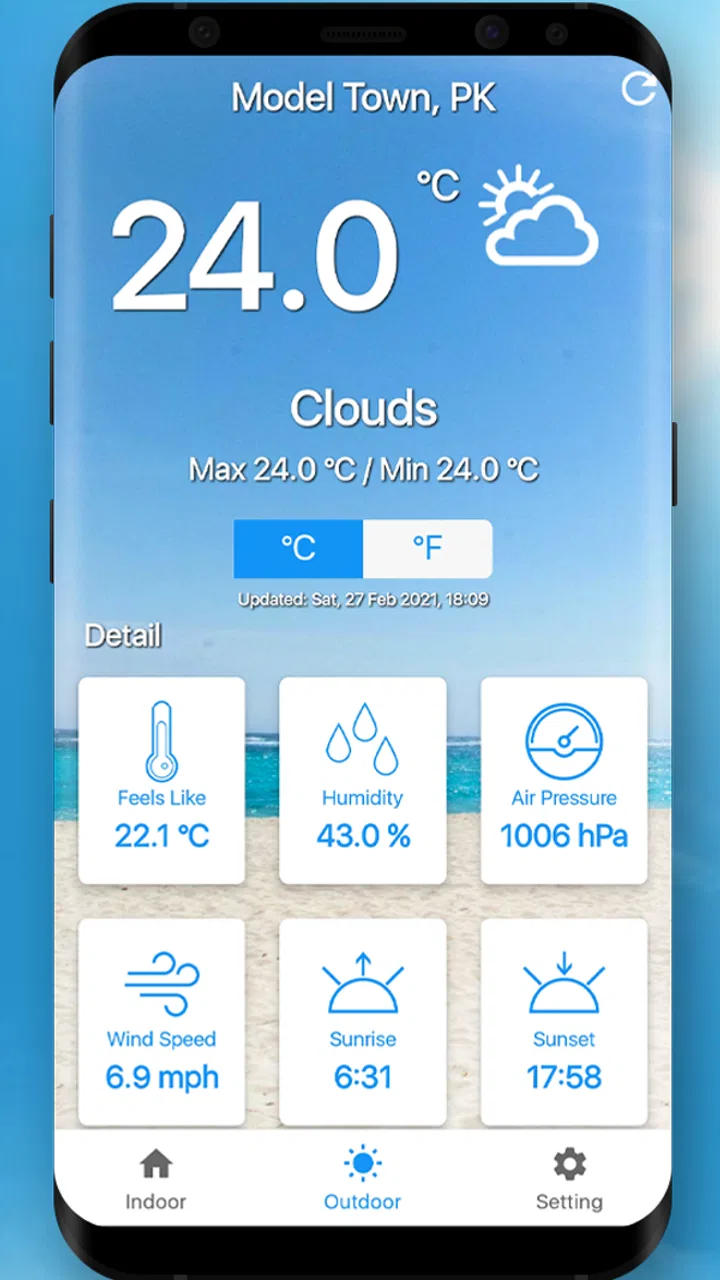
Compared with the usual weather apps, this one has a narrower purpose. Weather services generally describe outdoor conditions or forecasts for a location, while this app is intended for the immediate indoor environment around the phone. That makes it more relevant for a room check, but also more dependent on phone placement and device behavior.
My practical verdict
After using it with realistic expectations, I see Thermometer For Room Temp as a convenient indoor check rather than a replacement for hardware. Its strongest quality is accessibility: I can try it without buying a separate instrument, use it during ordinary household routines, and compare changes from one room or moment to another.
The main friction is not complicated navigation; it is measurement discipline. A warm phone, poor placement, direct sunlight, charging, or a rapidly changing room can all make the result less useful. Once I build in a short settling routine and treat the display as an estimate, the experience becomes much more sensible.
Micro Inc has kept the concept focused, and the app’s current version remains available for Android devices from 6.0 onward. With an average of 4.0 and a broad base of users, it appears to meet a basic need for many people, though that should not be confused with professional precision.
My recommendation is simple: install it if you want a quick way to investigate indoor comfort and you are willing to verify important readings with a real thermometer. I would not rely on it alone for safety, medical, or temperature-sensitive tasks. For casual room comparisons and everyday curiosity, it is a useful free starting point; for dependable measurement, dedicated hardware is still the better choice.
FAQs for Thermometer For Room Temp
01How accurate is the Thermometer For Room Temp app?
The Thermometer For Room Temp app uses your device's internal sensors to estimate ambient temperature. While it provides a good approximation, it's important to note that smartphone sensors can be influenced by the device's internal temperature and other environmental factors. For the most precise readings, compare with a dedicated room thermometer.
02Does the app require an internet connection to function?
The Thermometer For Room Temp app does not require an internet connection for basic temperature readings. However, some additional features, such as weather updates or syncing data with other devices, may require an internet connection to function properly. Always check the app’s permissions and settings for optimal use.
03Can the app measure outdoor temperature?
The app is primarily designed to measure indoor room temperature. For outdoor temperatures, it relies on internet-based weather services to provide estimates. If you're looking for precise outdoor readings, consider using a dedicated weather station or a specialized app designed for outdoor temperature measurement.
04Is the Thermometer For Room Temp app free to use?
The app is typically free to download and use for basic features. However, there may be in-app purchases or a premium version available that offers additional features, such as no ads, extended functionality, or higher precision. Always check the app store listing for detailed pricing information.
05What devices are compatible with the Thermometer For Room Temp app?
The Thermometer For Room Temp app is available for both Android and iOS devices. It is compatible with most modern smartphones and tablets that have built-in sensors required for temperature estimation. Ensure your device's operating system is updated to the latest version for optimal performance and compatibility.
Pros
- Accurate temperature readings quickly.
- Simple
- user-friendly interface.
- No intrusive ads.
- Lightweight and fast performance.
- Compatible with most devices.
Cons
- Requires internet connection.
- Limited advanced features.
- Occasional sensor calibration needed.
- Ads-free version is paid.
- Not suitable for outdoor use.

Thermometer For Room Temp
Gallery